
Quick Start
What you will learn/build: How to plan your first game concept by defining a core loop, clear rules and a win condition. You will create a short written design for a simple game and a basic playable prototype idea.
Skill level: Beginner (no coding required to plan; optional basic coding for prototype).
Time needed: 1–3 hours to plan and write the game design; 4–8 hours to make a simple prototype using a beginner tool (optional).
What you need: Notebook or text editor, pen, optional: free game tool (Unity, Godot, Construct, or Scratch), phone or PC for testing.
Introduction: Why core loop, rules and win condition matter
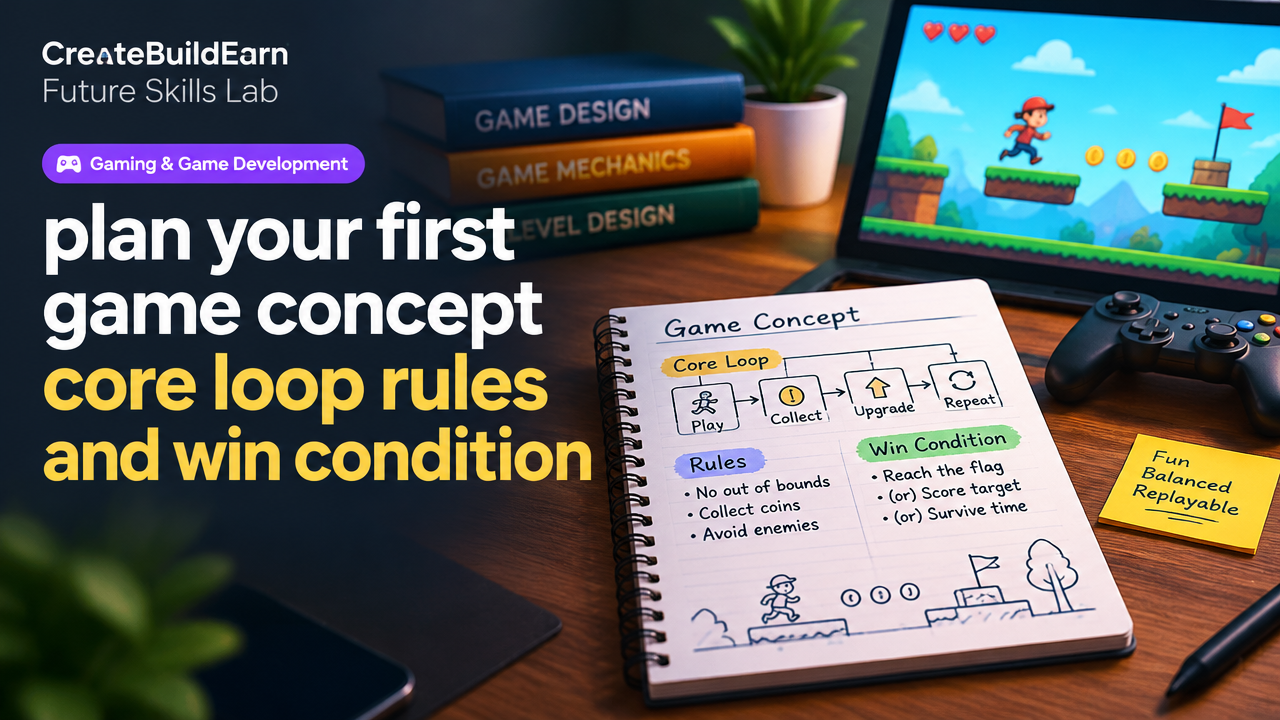
Every playable game rests on three simple design pillars: the core loop (what players repeat), the rules (what is allowed and not), and the win condition (how the game ends or rewards success). If these are clear, you can design levels, balance difficulty and create a satisfying player experience—even before writing code.
Explain the concepts simply
Core loop: The short, repeatable cycle a player goes through, like “collect → spend → upgrade → repeat.” A strong core loop is fun to repeat and offers meaningful progress.
Rules: The constraints and mechanics that govern the loop—how objects interact, what actions are available, and how scoring works.
Win condition: What makes the game end or gives the player a clear success signal. It might be a score target, completing levels, surviving time, or a story goal.
Prerequisites: what to understand before you start
- Basic idea of the game type (platformer, puzzle, idle, card game, etc.).
- Simple paper-and-pen prototyping skills (flow diagrams or sketches).
- Curiosity about player motivation: why would someone keep playing?
Step-by-step path to plan your first game concept
- Pick a simple game idea. Start small: an endless runner, match puzzle, top-down shooter, or a tap-to-collect mobile game.
- Write the core loop in one sentence. Example: “Run → dodge obstacles → collect coins → spend coins on upgrades → run again.”
- List 3–6 actions the player can take. Move left/right, jump, shoot, collect, pause, buy upgrades.
- Define the rules that connect actions to outcomes. What happens when two objects collide? How many lives? What costs upgrades?
- Set the win and lose conditions. When does a player win or lose? Is it time-limited, score-based, or level-completion?
- Add short-term goals and feedback. Small rewards, sound effects, visual cues that make the loop feel satisfying.
- Balance numbers roughly. Decide points per action, cost of upgrades, difficulty pacing. Keep values simple at first and plan to iterate.
- Make a paper prototype or quick digital mockup. Play it yourself for a few loops and note what feels good or boring.
Worked example: “Coin Dash”—a tiny mobile arcade idea
We’ll plan a simple one-touch mobile game called Coin Dash. This example shows how to write the core loop, rules and win condition with numbers.
- Core loop (one sentence): Tap to jump over obstacles → collect coins → reach score target or survive time → upgrade jump or speed → repeat.
- Player actions: Tap to jump, hold to charge higher jump, swipe down to grind (optional).
- Rules:
- Player starts with 3 lives.
- Colliding with an obstacle loses 1 life.
- Coins worth 1 point each; every 50 points gives one extra life (cap 5 lives).
- Upgrades: Double jump (cost 100 coins), Magnet (50 coins) for 10 seconds to attract coins.
- Win condition: Reach 200 coins (score target) or survive 180 seconds in endless mode variant.
- Balancing quick math: Average coins per 30-second run = 20. That means a player needs about 10 runs to get 200 coins if no upgrades—so tune spawn rates or rewards to speed up progress.
Practical table: quick design checklist
| Design Area | Example/Decision |
|---|---|
| Game type | One-touch endless runner |
| Core loop | Tap to jump → collect → upgrade → repeat |
| Key actions | Tap jump, hold charge |
| Primary rule | Hit obstacle = -1 life |
| Win condition | 200 coins or survive 180s |
| Progress mechanics | Upgrades cost coins; coin pickups, occasional bonus chest |
Try It Now / Mini Project
Write a one-page design for a tiny game by following these steps. Time: 45–90 minutes.
- Choose a type: e.g., puzzle, runner, clicker.
- Write the core loop in one sentence.
- List 3 player actions and 3 game rules that connect actions to outcomes.
- Set a clear win condition and one short-term goal (daily or level goal).
- Sketch one screen on paper showing HUD: score, lives, upgrades.
- Playtest by describing 5 cycles of play and note what felt fun or boring.
Optional next step: use Scratch, Construct or Godot to make a single level where the player can perform the core loop once.
Checkpoint / Self-review
Ask yourself these quick questions after planning or prototyping:
- Is the core loop a clear, short cycle players will repeat?
- Are the rules simple to explain in one paragraph?
- Is the win condition clear and achievable within 5–15 minutes of play (for early testing)?
- Can you name what makes the loop enjoyable—skill, randomness, progression or reward?
Common mistakes to avoid
- Complicating the core loop: adding too many systems before the main loop is fun.
- Vague win condition: if players don’t know when they win or why it matters, motivation drops.
- Poor feedback: no sound, visual cues or score changes make actions feel meaningless.
- Bad pacing: upgrades too expensive or too cheap destroy sense of progress.
Review checklist (ready to prototype?)
| Yes | Item |
|---|---|
| One-sentence core loop written | |
| 3–6 player actions listed | |
| Rules defined with outcomes | |
| Clear win/lose condition set | |
| Quick balancing numbers added | |
| Simple paper prototype or sketch created |
Next practice: how to iterate and test
- Create a simple playable prototype of just the core loop (no shops, no levels).
- Play it for 10 minutes, then change one number (coin spawn, cost, or life count) and play again.
- Note how the change affected fun and difficulty—iterate fast.
- Once stable, add one new system (upgrade, timer, or enemy) and repeat the cycle.
Links to helpful internal guides
- App Idea Validation: User Flow, Wireframe and Prototype Beginner Guide — validate your idea before building.
- Write a Project Case Study for a Beginner Portfolio — document your game design and prototype.
- Build First Portfolio Website Project Plan and Progress Log — show your game project online.
- Future Skills Roadmap — improve design and communication skills useful for game careers.
Frequently Asked Questions
How long should a core loop take to perform?
A core loop should be short: typically 10–60 seconds for casual mobile games, or 1–5 minutes for deeper loops. Short loops make it easy to iterate and keep players engaged.
Should I design a win condition or make endless games?
Both are valid. For a first project, choose a clear short-term win condition (score or survive) so you can test and measure success. Endless modes can be added later with soft goals like milestones.
How do I balance numbers like scores and costs?
Start simple: choose round numbers, playtest, and adjust. Track average player performance over several runs and tune costs so progression feels steady but not instant.
Can I use AI to help design my core loop?
Yes, use AI to generate ideas or check wording, but verify results yourself: test mechanics on paper or in a prototype and avoid sharing private or copyrighted assets. Use AI safely and check facts it provides.
Is it better to design rules before visuals?
Design rules and loop first. Visuals should support clarity and feedback but not replace a working loop. Clear gameplay makes visuals easier to choose and test.
How do I know if my game is fun?
Fun shows up as repeated engagement: you want to play another run, improve a score, or explore upgrades. Use short playtests with friends and ask specific questions: “Did you want to try again? Why?”
What tools are best for simple prototypes?
Beginner-friendly tools include Scratch, Construct, and Godot. Choose one that matches your comfort with code: Scratch for visual blocks, Godot for learning scripting, Construct for drag-and-drop logic.
How do I document my game design?
Write a 1–2 page design doc covering core loop, actions, rules, win/lose conditions, and balancing notes. Keep it concise so you can iterate quickly. Use the project case study guide linked above when finished.
Conclusion and next skill to learn
Planning your first game concept around a clear core loop, simple rules and an explicit win condition helps you build faster and test ideas sooner. Your next skill should be rapid prototyping: learn a beginner tool (Scratch, Construct or Godot) and make a minimal playable version of your core loop. After that, practice iteration and document results in a short case study for your portfolio.
Ready to prototype? Start small, test fast, and improve with each playthrough.
Learn it by building something
Use the guide as a learning checklist, build a small version yourself, test it, explain what you learned and then improve the project.
How this guide was prepared
This guide is prepared for everyday readers using practical research, usability checks and editorial review. Product or tool-specific claims should be verified against current official documentation when needed.
How did you like this article?
Your feedback helps us make our guides more useful.


Join the Discussion
Join the conversation and share a useful tip, question or experience.