
Quick Start
- What you will learn/build: How to confirm an app idea is worth building by mapping a user flow, creating low-fidelity wireframes and a simple clickable prototype for user testing.
- Skill level: Beginner — no advanced coding required.
- Time needed: 3–8 hours for a first validation cycle (sketch, wireframes, prototype, 3–5 quick tests).
- What you need: Paper and pen or a free digital tool (Figma Free, Adobe XD Starter, Marvel), 3–5 testers (friends, classmates), a list of core tasks your app must do.
Introduction: What this guide is for
This guide teaches a simple, practical flow to check whether an app idea deserves development. You will go from a basic idea to a testable prototype using clear steps: define the core problem, map the user flow, sketch wireframes, create a clickable prototype and run quick tests to collect real feedback.
Why validate app ideas first
Building an app without validation risks wasting time and money on features people don’t need. Early validation reduces risk by proving whether users understand the app and can complete the main tasks. It also helps you limit scope for an MVP (minimum viable product).
Prerequisites
- Basic idea statement: one sentence describing the problem and target user (example below).
- Tools: paper and pen or a digital mockup tool (Figma Free, Adobe XD Starter, or even Google Slides).
- Devices for testing: a phone or laptop to run the prototype.
- 3–5 people who represent target users and time to talk to them for 5–10 minutes each.
Step-by-step path: From idea to prototype
- Write a one-line value statement. Example: “Help university students find or create small study groups nearby.” Keep it short: who, what, why.
- Define primary user goal(s). List the top 2 tasks users must complete. Example: (1) Find study groups by subject and time; (2) Request to join.
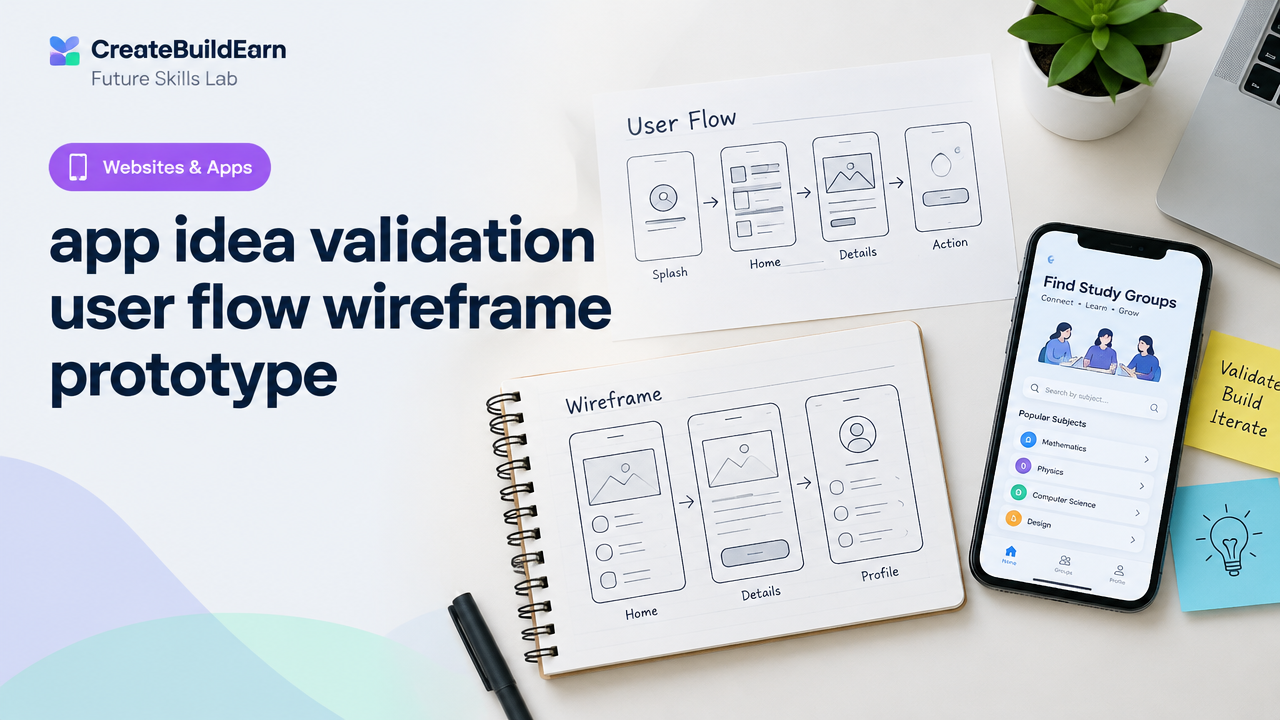
- Map a simple user flow. Draw a flow of screens needed for the primary task. Keep it to 4–6 screens for initial validation.
- Sketch low-fidelity wireframes. Use paper or digital boxes to show layout and main elements — buttons, lists, input fields.
- Turn wireframes into a clickable prototype. Use Figma, Adobe XD, or Google Slides linking screens. Keep interactions minimal: next, back, and a submit action.
- Test with 3–5 real users. Give simple tasks and observe; don’t lead them. Ask them to think aloud or answer a few questions after they try the prototype.
- Collect feedback and measure. Note where users get stuck and whether they complete the core task. Decide whether to iterate or stop.
Worked example: Study-Group Finder app
Idea statement: “A phone app that helps campus students find small study groups by subject and slot availability.”
- User goals: Find groups, view details, request to join.
- User flow (4 screens): Home (search) → List of groups → Group detail → Request sent confirmation.
- Key wireframe elements: search bar, filters (subject/time), group card (name, members, next meeting), request button, confirmation modal.
- Prototype actions: search → tap group → tap request → confirm.
Test result example (hypothetical): 4 users completed the task; 1 user expected a map view. Action: add a map toggle in next iteration.
Wireframe elements checklist
| Screen | Key Element | Purpose |
|---|---|---|
| Home / Search | Search bar, filters | Help users find relevant groups fast |
| List | Group cards with summary info | Scan results and choose one |
| Detail | Full info, join button | Decide and take action |
| Confirmation | Success message, next steps | Clear feedback that action worked |
Simple wireframe HTML example (learning example)
This small HTML snippet shows how you can structure a low-fidelity web wireframe. It’s a learning example — not a production app.
<!-- Learning example: simple wireframe structure -->
<div class="screen home">
  <header><h1>Study Groups</h1></header>
  <div class="search"><input placeholder="Search subject or campus" /></div>
  <div class="list">
    <div class="card">
      <h3>Calculus Study Group</h3>
      <p>3 members • Mon 6pm</p>
      <button>View</button>
    </div>
  </div>
</div>
How to create a quick clickable prototype
- Choose a tool: Figma Free is beginner-friendly and lets you link frames into flows.
- Import or recreate wireframes as simple frames with clear labels.
- Add basic interactions: click to navigate between frames; avoid fancy micro-interactions at this stage.
- Prepare test tasks that match your user goals, e.g. “Find a study group for Calculus on Monday and request to join.”
Try It Now / Mini Project
Goal: Validate one app idea in one day.
- Write a one-line idea and 2 user goals (15 minutes).
- Sketch the user flow on paper (15 minutes).
- Draw low-fidelity wireframes for 4 screens (30 minutes).
- Create a clickable prototype in Figma or Google Slides (60–90 minutes).
- Test with 3 people, record observations (30–60 minutes).
Deliverables: one idea statement, 4 wireframe images/screens, one clickable prototype link, notes from 3 tests. Use the checklist below to confirm you’re ready to test.
Checkpoint: Self-review questions
- Does the prototype let a tester complete the main task in 3–6 steps?
- Did at least 3 testers understand the idea without explanation?
- Where did testers hesitate or ask questions? Can you simplify that screen?
- Is the core value obvious within 10 seconds of seeing the first screen?
Common mistakes and how to avoid them
- Trying to build everything: Start with one core task and test it before adding features.
- Asking leading questions: Let testers try while you observe. Ask open questions after the test.
- Using high-fidelity design too early: Low-fidelity wireframes are faster and encourage honest feedback.
- Testing the wrong users: Pick testers who match your target audience, even if they are just classmates.
Review checklist before you call it validated
| Item | Yes / No |
|---|---|
| Primary task completed by majority of testers | |
| Users understood what the app does | |
| Key confusion areas identified | |
| Next-step improvements listed |
Next practice: iterate and plan an MVP
After validation, narrow features to the smallest set that delivers the core value. Create a development plan and a simple backlog with priorities.
Recommended internal reading to continue:
- 5-Week Build Your First Website Learning Path
- HTML CSS Profile Card Mini Project
- Write a Project Case Study for a Beginner Portfolio
- Responsive Web Design Mobile-First Basics
Frequently Asked Questions
How many users should I test with for a quick validation?
Test with 3–5 users for an early validation round. This gives quick, actionable feedback. For more reliable statistics you need larger samples later.
Do I need to code to make a prototype?
No. Use tools like Figma, Adobe XD or Google Slides to make clickable prototypes without coding. Simple HTML can be used if you want a very basic web prototype.
What is the difference between a wireframe and a prototype?
A wireframe is a low-fidelity layout showing structure and content. A prototype is interactive and lets users experience the navigation and basic flows.
How do I find testers if I don’t know many users?
Ask classmates, colleagues, family, or post in small local community groups. Aim for people who match the target audience rather than strangers for the first round.
Should I use real user data in prototypes?
No — avoid real personal or sensitive data in prototypes. Use placeholder names and anonymised examples. Follow privacy and safety rules when collecting feedback.
What if users say they love the idea but don’t use it?
Listen for specific barriers and motivators. Ask follow-up questions about how they would use it, when, and what would make them return. Positive comments are not proof of usage.
Can I validate an app idea with a landing page instead of a prototype?
Yes. A landing page with a clear value statement and a call-to-action (signup, waitlist) can validate interest before you prototype. Combine approaches for stronger validation.
Is user testing expensive?
No—early testing can be low-cost. Use free tools and testers from your network. The goal is quick learning, not polished testing sessions.
Conclusion: Next skill to learn
After you validate a core task, the next skill is planning an MVP and turning wireframes into a development-ready prototype or a simple first release. Learn version control basics, simple front-end building, or team handoff workflows next.
Good next reads: “Build an AI Assisted Study Quiz Project” or “Write a Project Case Study for a Beginner Portfolio” to document and show your validation work.
Learn it by building something
Use the guide as a learning checklist, build a small version yourself, test it, explain what you learned and then improve the project.
How this guide was prepared
This guide is prepared for everyday readers using practical research, usability checks and editorial review. Product or tool-specific claims should be verified against current official documentation when needed.
How did you like this article?
Your feedback helps us make our guides more useful.

Join the Discussion
Join the conversation and share a useful tip, question or experience.