
- What you will learn/build: Clear, practical understanding of how search engines crawl, index and rank pages and a mini-project to make a small website discoverable.
- Skill level: Beginner
- Time needed: 60–120 minutes (more if you host the site)
- What you need: A computer, a browser, a simple 2–3 page website or local HTML files (optional hosting), and curiosity. Optional: Google Search Console or similar tools (verify with provider).
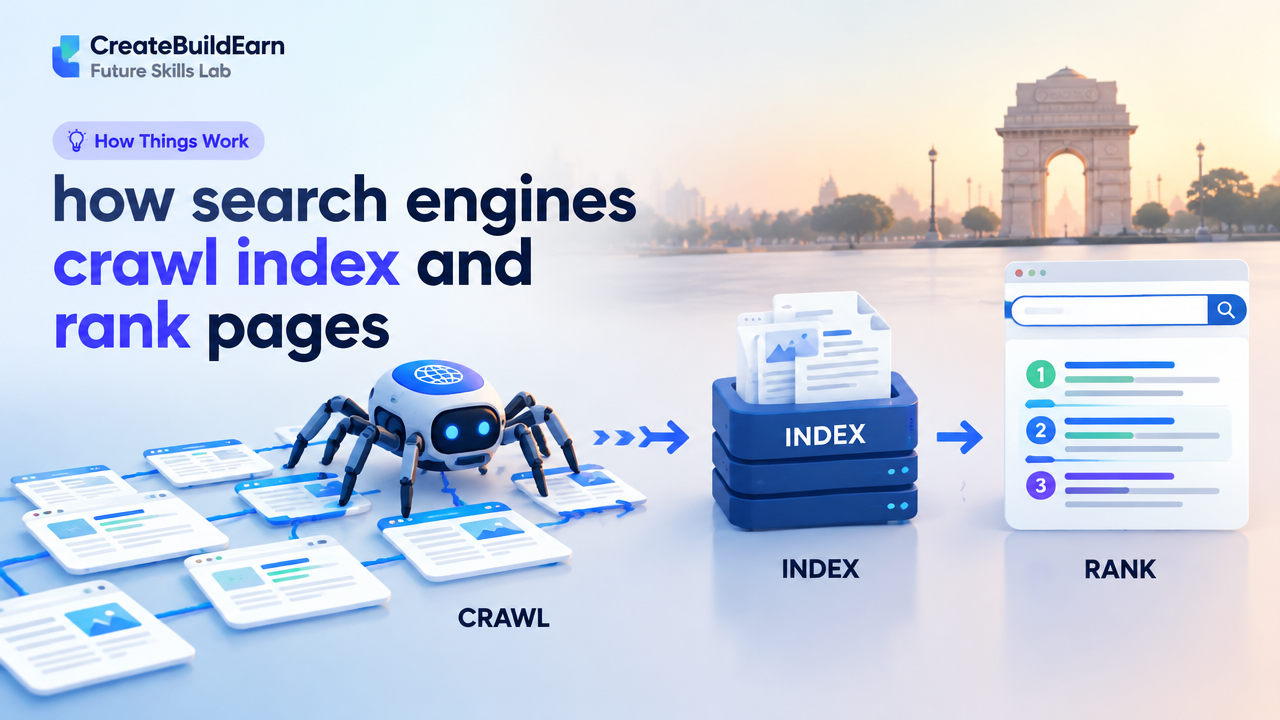
Search engines (like Google or Bing) help people find pages on the web. They follow links and site maps to discover pages (crawl), store what they learn (index), and then order results so users find the most useful pages first (rank). This guide explains each step in plain language and gives a practical path to make your pages visible.
1. What “crawl”, “index” and “rank” mean
Keep these three words clear in your mind:
- Crawl — A search engine bot (also called crawler or spider) visits pages by following links and sitemaps to discover content.
- Index — The engine processes and stores the content it found so it can retrieve pages for search queries.
- Rank — When someone searches, the engine orders relevant indexed pages by usefulness and quality so the best pages appear first.
2. How crawling works (simple sequence)
Crawling starts with a list of known URLs and grows from links and sitemaps. Key ideas:
- Search bots fetch pages using HTTP like a browser does, reading HTML, CSS and sometimes JavaScript.
- Bots follow links from page to page. Good internal linking helps discovery.
- Sitemaps (XML) tell crawlers which pages exist and which changed recently.
- robots.txt at site root tells bots which parts to avoid. It does not hide content from the web—only tells bots where not to crawl.
- Crawl budget describes how many pages and how often a search engine will crawl a site. For most small sites this is not a major issue, but clean, fast pages help.
3. How indexing works
Indexing is the process of understanding and storing page content. The search engine:
- Parses HTML to read text, headings, links and metadata (title, meta description, canonical).
- Applies structured data (if present) to better understand specific facts (like recipe times, product price).
- Handles duplicate content: canonical tags help the engine pick the preferred URL.
- May choose not to index low-value or restricted content.
4. How ranking works (overview for beginners)
Ranking uses many signals. Engines keep the exact formulas private, but common categories are:
- Relevance: How well the page content matches the search query (keywords in context).
- Quality & authority: Signals from other sites (links), on-page quality and trustworthiness.
- User experience: Page speed, mobile-friendliness, safe browsing and clear layout.
- Freshness: New or updated content can rank better for time-sensitive topics.
- Context & personalization: Location, language and user intent change results.
Think of ranking as the engine trying to answer: “Which page will best satisfy the searcher right now?”
5. Practical step-by-step path: make a page crawlable, indexable and ready to rank
- Create clear content: Give each page a helpful title, short meta description, clear headings (H1, H2), and useful text.
- Ensure technical access: Put a valid robots.txt at /robots.txt and create an XML sitemap listing important URLs.
- Use canonical URLs: Add a canonical link in the head to avoid duplicate content issues.
- Make pages fast and mobile-friendly: Compress images, use responsive design, enable HTTPS (SSL).
- Use internal links: Link related pages to help bots and users navigate.
- Earn simple backlinks: Share your page with community posts, classmates, or relevant blogs—don’t spam.
- Monitor with tools: Verify your site with search engine tools (e.g., Google Search Console) to see crawl/index status and errors. Follow verification instructions from the provider.
6. Mini-project: Make a tiny 3-page site discoverable
Goal: Build three pages (home, about, article) and make sure a crawler can find and index them. Time: 60–120 minutes.
Steps:
- Create three HTML files (index.html, about.html, article.html). Add a clear title and an H1 on each page.
- Add links between pages (navigation) so bots can follow.
- Add a simple robots.txt at the root to allow crawling:
(Learning example: change the URL to your site.)
- Create a basic sitemap.xml listing the three pages and upload it to your site root. Example entry:
5. Add a canonical tag in each page head (example):
6. If you host the site, verify it with a search console tool to request indexing. If you test locally, use tools like the hosted public URL or temporary hosting to let crawlers access it.
7. Quick checklist (what to check and where)
| Item | Why it matters | Where to check |
|---|---|---|
| robots.txt | Tells bots what to crawl | https://yourdomain.example/robots.txt |
| XML sitemap | Helps discovery of pages | Sitemap URL & search console |
| Page title & H1 | Shows main topic | View page source |
| Mobile-friendly | Better user experience | Mobile emulator / PageSpeed |
8. Checkpoint: self-review questions
- Can a visitor reach every page by following links from the home page?
- Is your robots.txt allowing the pages you want crawled?
- Is there a sitemap.xml and does it list your important pages?
- Does each page have a clear title and H1 that match the content?
- Is your site HTTPS and reasonably fast on mobile?
9. Common mistakes beginners make
- Blocking pages by mistake in robots.txt or meta robots (“noindex”).
- Duplicating content across many URLs without canonical tags.
- Relying only on meta description to rank — it helps click-through, but content matters for ranking.
- Using heavy JavaScript without server-side or pre-rendering so bots can’t see content.
- Trying to “trick” search engines with hidden text or spammy links — this risks penalties.
10. Review checklist before asking for indexing
- All important pages reachable via links or in sitemap.xml.
- No accidental noindex/Disallow rules.
- Page titles & headings describe the content accurately.
- Site loads over HTTPS and is mobile-friendly.
- Useful internal links and at least a few legitimate external mentions.
Next practice and internal learning links
After you finish the mini-project, try these focused reads to grow your skills:
- SEO Basics: How Search Engines Understand a Page
- How a Website Works From Browser to Server
- How to Make a Website: A Beginner Roadmap
- How to Start a Blog: A Beginner Roadmap
Frequently Asked Questions
How long does it take for a new page to appear in search results?
There is no fixed time. It can be hours to weeks depending on crawl frequency, site authority and whether you requested indexing. Use search console tools to monitor status and request indexing where available, following the tool’s verification steps.
Will putting a page in a sitemap guarantee it will be indexed?
No. A sitemap helps discovery but the search engine still decides whether to index a page based on content quality, duplication and other signals.
What does robots.txt do and what doesn’t it do?
robots.txt tells crawlers which parts of your site they should not request. It does not remove a page from search results if it has already been indexed. To prevent indexing, use a meta robots noindex tag or proper removal tools in the search console.
Can JavaScript stop a page from being indexed?
Yes, if important content is rendered only by JavaScript and the search engine cannot execute it, the engine may not see that content. Use server-side rendering or ensure critical content is present in the initial HTML when possible.
Are backlinks necessary for ranking?
Backlinks are an important quality signal because they indicate other sites find your content useful. However, focus on creating valuable content and earning natural links rather than buying or spamming links.
Is there a single checklist to follow every time?
Use the review checklist in this article each time you publish a page. That checklist covers the core technical and content items that help pages be crawled, indexed and given a chance to rank.
How do I check if my pages are mobile-friendly?
Use browser mobile emulators and page speed tools that include mobile checks. Search console tools also report mobile usability problems for verified sites.
Conclusion
Understanding how search engines crawl, index and rank pages helps you publish content that can be found and trusted. Start small: build a few clear pages, add a sitemap, check robots.txt, and verify with a search tool. The practical next skill is to learn how engines understand page content in more detail—see “SEO Basics: How Search Engines Understand a Page” to continue.
Learn it by building something
Use the guide as a learning checklist, build a small version yourself, test it, explain what you learned and then improve the project.
How this guide was prepared
This guide is prepared for everyday readers using practical research, usability checks and editorial review. Product or tool-specific claims should be verified against current official documentation when needed.
How did you like this article?
Your feedback helps us make our guides more useful.



Join the Discussion
Join the conversation and share a useful tip, question or experience.